Working with Variables
Variables let you create templates that generate personalized documents. Instead of hardcoding values, you use placeholders that get replaced with real data at render time.
The Basics
Variables use double curly braces: {{variableName}}
When you render a template, you send JSON data. TemplateTo replaces each variable with the corresponding value from your data.
Template:
Data:
Result:
Adding Test Data
In the template editor, paste your JSON into the Template Data panel to test your template.

Sample JSON Data
{
  "customerInvoice": {
    "name": "Lynx",
    "total": "123",
    "lines": [
      { "sku": "qwe123", "qnt": "2", "name": "Fragrance", "total": "82" },
      { "sku": "qwe124", "qnt": "1", "name": "Fragrance Bold", "total": "41" }
    ],
    "date": "15/11/23"
  },
  "email": "[email protected]",
  "country": "UK"
}
For simple key-value data, use the Create button to add variables without writing JSON manually.
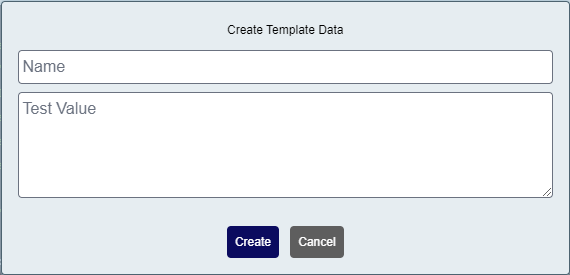
Using Variables in Templates
From the Editor
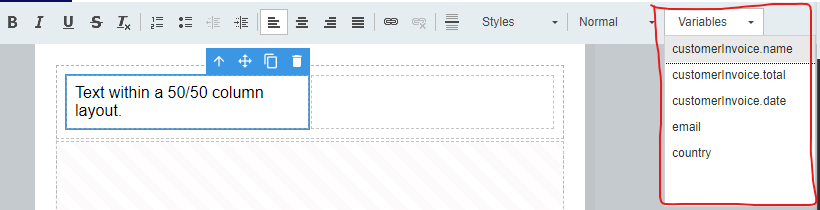
Use the variable dropdown to insert variables without typing:
By Typing
Type the variable name directly in your HTML:
Accessing Nested Data
Use dot notation to access nested properties:
<!-- Access nested object properties -->
{{customerInvoice.name}}
{{customerInvoice.total}}
{{customerInvoice.date}}
For more complex data access patterns including arrays, see Data Binding.
Liquid Templating
TemplateTo uses the Liquid templating engine. This gives you:
- Variables:
{{variable}} - Logic:
{% if condition %}...{% endif %} - Loops:
{% for item in collection %}...{% endfor %} - Filters:
{{value | filter}}
See Liquid Reference for complete syntax documentation.
Computed Variables
For complex transformations, create Liquid Variables in the editor:
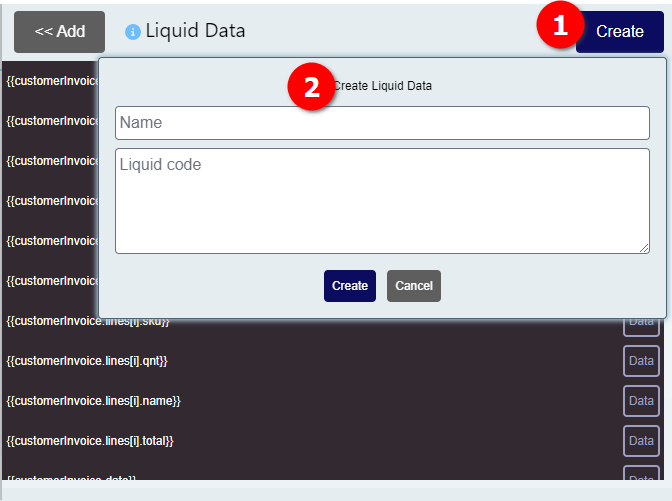
- Navigate to the Data tab in the editor
- Give your variable a name
- Write your Liquid expression
Variable Order
If one variable uses another, define the dependency first. Variables are processed in order.
Example: Create a computed variable called formattedDate:
Then use it in your template:
Next Steps
- Data Binding - Learn about arrays, nested access, and JSON patterns
- Filters & Tags - Format dates, numbers, and more
- Liquid Reference - Complete Liquid syntax guide