REST API
The REST API allows you to generate documents synchronously, returning the document directly in the response. This is ideal for simple integrations where you need the document immediately.
Overview
- Synchronous - Document is returned directly in the response
- Formats - PDF and TXT supported
- Response types - File download or Base64 encoded string
For Large Documents
For large documents or high-volume generation, consider using the Async Rendering API which processes documents in the background.
Authentication
All endpoints require an API key. Pass your API key in the X-Api-Key header.
See API Key Management for details on creating API keys.
Base URL
Endpoints
Generate PDF
Generate a PDF document from a template.
Path Parameters
| Parameter | Type | Description |
|---|---|---|
templateId |
string | Your template ID |
Request Body
Pass your template data as JSON:
{
  "customerName": "Acme Corp",
  "invoiceNumber": "INV-2024-001",
  "items": [
    { "description": "Widget", "quantity": 5, "price": 10.00 },
    { "description": "Gadget", "quantity": 2, "price": 25.00 }
  ]
}
Response
Returns the PDF file directly with Content-Type: application/pdf.
Generate PDF (Base64)
Returns the PDF as a Base64 encoded string instead of a file download.
Response
Returns a Base64 encoded string representing the PDF.
Generate TXT
Generate a plain text document from a template.
Path Parameters
| Parameter | Type | Description |
|---|---|---|
templateId |
string | Your template ID |
Request Body
Same JSON format as PDF generation.
Response
Returns the TXT file directly with Content-Type: text/plain.
Generate PDF from Raw HTML
Generate a PDF from raw HTML content without using a template.
Request Body
Base64 Encoding
The HTML content must be Base64 encoded. In JavaScript: btoa(htmlString). In Python: base64.b64encode(html_string.encode()).decode().
Response
Returns the PDF file directly.
Complete Example
Here's a complete example in JavaScript:
const API_BASE = 'https://api.templateto.com';
const API_KEY = 'your-api-key';

async function generatePdf(templateId, data) {
  const response = await fetch(
    `${API_BASE}/render/pdf/${templateId}`,
    {
      method: 'POST',
      headers: {
        'X-Api-Key': API_KEY,
        'Content-Type': 'application/json'
      },
      body: JSON.stringify(data)
    }
  );

  if (!response.ok) {
    throw new Error(`Failed to generate PDF: ${response.status}`);
  }

  return await response.blob();
}

// Usage
const pdfBlob = await generatePdf('tpl_abc123', {
  customerName: 'Acme Corp',
  total: 150.00
});

// Download the PDF
const url = URL.createObjectURL(pdfBlob);
const a = document.createElement('a');
a.href = url;
a.download = 'document.pdf';
a.click();
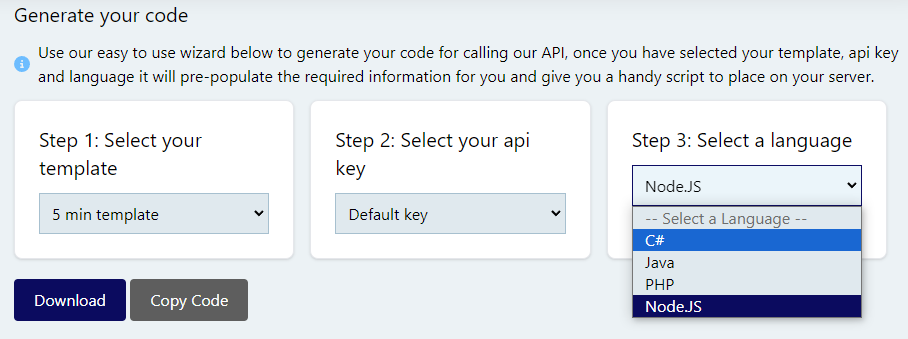
Code Builder
We have created a code builder to help you get up and running quickly. It generates code snippets in multiple languages based on your template.
Error Handling
Common Error Responses
| Status Code | Meaning |
|---|---|
| 400 | Invalid request (missing data, invalid template ID) |
| 401 | Authentication required or invalid API key |
| 404 | Template not found |
| 500 | Internal server error |