REST API
The REST API allows you to generate documents synchronously, returning the document directly in the response. This is ideal for simple integrations where you need the document immediately.
Overview
- Synchronous - Document is returned directly in the response
- Formats - PDF, PNG, JPEG, and TXT supported
- Response types - File download or Base64 encoded string
For Large Documents
For large documents or high-volume generation, consider using the Async Rendering API which processes documents in the background.
Authentication
All endpoints require an API key. Pass your API key in the X-Api-Key header.
See Authentication for details on creating and managing API keys.
Base URL
Common Patterns
These patterns apply across all output formats (PDF, Image, TXT).
Endpoint Structure
All render endpoints follow a consistent pattern:
| Pattern | Description |
|---|---|
/render/{format}/{templateId} |
Render template, return file |
/render/{format}/{templateId}/as-byte-array |
Render template, return Base64 |
/render/{format}/{templateId}/v/{versionId} |
Render specific version, return file |
/render/{format}/{templateId}/v/{versionId}/as-byte-array |
Render specific version, return Base64 |
/render/{format}/fromhtml |
Render raw HTML, return file |
Where {format} is pdf, image, or txt.
Request Body
All endpoints accept your template data as JSON in the request body:
{
  "customerName": "Acme Corp",
  "invoiceNumber": "INV-2024-001",
  "items": [
    { "description": "Widget", "quantity": 5, "price": 10.00 }
  ]
}
Base64 Response
Add /as-byte-array to any template endpoint to receive a Base64 encoded string instead of a file download.
POST /render/pdf/{templateId}/as-byte-array
POST /render/image/{templateId}/as-byte-array
POST /render/txt/{templateId}/as-byte-array
This is useful when you need to embed the document in JSON or store it without file I/O.
Version-Specific Rendering
By default, rendering uses the latest published version of a template. To render a specific version, include the version ID in the path:
POST /render/pdf/{templateId}/v/{versionId}
POST /render/image/{templateId}/v/{versionId}
POST /render/txt/{templateId}/v/{versionId}
You can also combine with Base64 response:
Finding Version IDs
Version IDs are available in the template editor's version history panel.
Raw HTML Rendering
Generate documents from raw HTML without using a saved template:
The HTML content must be Base64 encoded in the request body:
Base64 Encoding
In JavaScript: btoa(htmlString)
In Python: base64.b64encode(html_string.encode()).decode()
PDF Endpoints
Generate PDF
Returns the PDF file with Content-Type: application/pdf.
Example
curl -X POST "https://api.templateto.com/render/pdf/tpl_abc123" \
  -H "X-Api-Key: your-api-key" \
  -H "Content-Type: application/json" \
  -d '{"customerName": "Acme Corp"}' \
  -o invoice.pdf
Generate PDF from Raw HTML
Request Body
Image Endpoints
Generate Image
Returns the image with Content-Type: image/png or Content-Type: image/jpeg.
Query Parameters
| Parameter | Type | Default | Description |
|---|---|---|---|
format |
string | png |
Output format: png or jpeg |
width |
integer | derived | Image width in pixels |
height |
integer | auto | Image height (only when fullpage=false) |
quality |
integer | 90 |
JPEG quality (0-100) |
fullpage |
boolean | true |
Capture full scrollable page |
scale |
float | 1 |
Device scale factor (use 2 for retina) |
clipX |
integer | - | X coordinate of clip region |
clipY |
integer | - | Y coordinate of clip region |
clipWidth |
integer | - | Width of clip region |
clipHeight |
integer | - | Height of clip region |
circular |
boolean | false |
Apply circular mask (forces PNG) |
Examples
# Generate PNG
curl -X POST "https://api.templateto.com/render/image/tpl_abc123" \
  -H "X-Api-Key: your-api-key" \
  -H "Content-Type: application/json" \
  -d '{"title": "Hello World"}' \
  -o output.png

# Generate JPEG with custom quality
curl -X POST "https://api.templateto.com/render/image/tpl_abc123?format=jpeg&quality=85" \
  -H "X-Api-Key: your-api-key" \
  -d '{}' \
  -o output.jpg

# Generate retina image (2x)
curl -X POST "https://api.templateto.com/render/image/tpl_abc123?scale=2" \
  -H "X-Api-Key: your-api-key" \
  -d '{}' \
  -o [email protected]

# Generate circular avatar
curl -X POST "https://api.templateto.com/render/image/tpl_abc123?clipX=0&clipY=0&clipWidth=200&clipHeight=200&circular=true" \
  -H "X-Api-Key: your-api-key" \
  -d '{}' \
  -o avatar.png
Generate Multiple Clips
Extract multiple regions from a single render. Efficient for generating multiple sizes from one template.
Request Body
{
  "data": {
    "title": "Summer Sale"
  },
  "clips": [
    { "name": "og-image", "x": 0, "y": 0, "width": 1200, "height": 630 },
    { "name": "twitter", "x": 0, "y": 0, "width": 1200, "height": 675 },
    { "name": "square", "x": 0, "y": 0, "width": 1080, "height": 1080 },
    { "name": "avatar", "x": 50, "y": 50, "width": 100, "height": 100, "circular": true }
  ]
}
Clip Options
| Field | Type | Required | Description |
|---|---|---|---|
name |
string | No | Identifier in response |
x |
integer | Yes | X coordinate (pixels from left) |
y |
integer | Yes | Y coordinate (pixels from top) |
width |
integer | Yes | Width in pixels |
height |
integer | Yes | Height in pixels |
circular |
boolean | No | Apply circular mask (forces PNG) |
format |
string | No | Override format (png or jpeg) |
Response
Returns a ZIP file (Content-Type: application/zip) containing:
- One image file per clip, named
{name}.{format}(e.g.,og-image.png) manifest.jsonwith metadata for each clip:
{
  "clips": [
    {
      "fileName": "og-image.png",
      "name": "og-image",
      "format": "png",
      "width": 1200,
      "height": 630
    }
  ]
}
Generate Image from Raw HTML
Request Body
{
  "base64HtmlString": "PGh0bWw+PGJvZHk+SGVsbG8gV29ybGQ8L2JvZHk+PC9odG1sPg==",
  "format": "png",
  "width": 1280,
  "height": 720,
  "quality": 90,
  "fullPage": false,
  "deviceScaleFactor": 1,
  "clip": {
    "x": 0,
    "y": 0,
    "width": 400,
    "height": 400,
    "circular": false
  }
}
Generate Multiple Clips from Raw HTML
Same request body format as template clips, but with base64HtmlString instead of data.
TXT Endpoints
Generate TXT
Returns plain text with Content-Type: text/plain.
Example
curl -X POST "https://api.templateto.com/render/txt/tpl_abc123" \
  -H "X-Api-Key: your-api-key" \
  -H "Content-Type: application/json" \
  -d '{"customerName": "Acme Corp", "message": "Thank you!"}' \
  -o message.txt
Code Examples
JavaScript - PDF Generation
const API_BASE = 'https://api.templateto.com';
const API_KEY = 'your-api-key';

async function generatePdf(templateId, data) {
  const response = await fetch(
    `${API_BASE}/render/pdf/${templateId}`,
    {
      method: 'POST',
      headers: {
        'X-Api-Key': API_KEY,
        'Content-Type': 'application/json'
      },
      body: JSON.stringify(data)
    }
  );

  if (!response.ok) {
    throw new Error(`Failed to generate PDF: ${response.status}`);
  }

  return await response.blob();
}

// Usage
const pdfBlob = await generatePdf('tpl_abc123', {
  customerName: 'Acme Corp',
  total: 150.00
});

// Download
const url = URL.createObjectURL(pdfBlob);
const a = document.createElement('a');
a.href = url;
a.download = 'invoice.pdf';
a.click();
JavaScript - Image Generation
async function generateImage(templateId, data, options = {}) {
  const params = new URLSearchParams();
  if (options.format) params.append('format', options.format);
  if (options.width) params.append('width', options.width);
  if (options.quality) params.append('quality', options.quality);
  if (options.scale) params.append('scale', options.scale);

  const queryString = params.toString() ? `?${params}` : '';

  const response = await fetch(
    `${API_BASE}/render/image/${templateId}${queryString}`,
    {
      method: 'POST',
      headers: {
        'X-Api-Key': API_KEY,
        'Content-Type': 'application/json'
      },
      body: JSON.stringify(data)
    }
  );

  return await response.blob();
}

// PNG
const png = await generateImage('tpl_abc123', { title: 'Hello' });

// JPEG with quality
const jpeg = await generateImage('tpl_abc123', { title: 'Hello' }, {
  format: 'jpeg',
  quality: 85,
  width: 1200
});

// Retina
const retina = await generateImage('tpl_abc123', { title: 'Hello' }, {
  scale: 2
});
JavaScript - Multiple Clips
async function generateClips(templateId, data, clips) {
  const response = await fetch(
    `${API_BASE}/render/image/${templateId}/clips`,
    {
      method: 'POST',
      headers: {
        'X-Api-Key': API_KEY,
        'Content-Type': 'application/json'
      },
      body: JSON.stringify({ data, clips })
    }
  );

  // Response is a ZIP file containing one image per clip + manifest.json
  return await response.blob();
}

// Generate social media sizes in one request
const zip = await generateClips('tpl_abc123',
  { title: 'Summer Sale' },
  [
    { name: 'og', x: 0, y: 0, width: 1200, height: 630 },
    { name: 'twitter', x: 0, y: 0, width: 1200, height: 675 },
    { name: 'instagram', x: 0, y: 0, width: 1080, height: 1080, format: 'jpeg' }
  ]
);

// ZIP contains: og.png, twitter.png, instagram.jpeg, manifest.json
JavaScript - Version-Specific Rendering
async function generatePdfVersion(templateId, versionId, data) {
  const response = await fetch(
    `${API_BASE}/render/pdf/${templateId}/v/${versionId}`,
    {
      method: 'POST',
      headers: {
        'X-Api-Key': API_KEY,
        'Content-Type': 'application/json'
      },
      body: JSON.stringify(data)
    }
  );

  return await response.blob();
}

// Render a specific template version
const pdf = await generatePdfVersion('tpl_abc123', 'ver_xyz789', {
  customerName: 'Acme Corp'
});
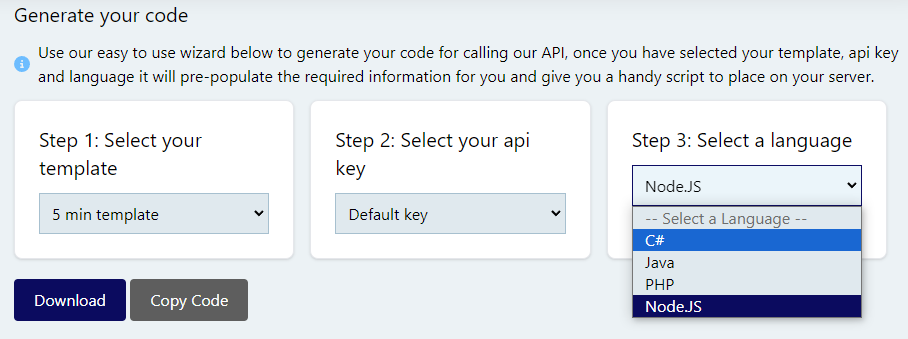
Code Builder
Generate code snippets in multiple languages based on your template:
Error Handling
HTTP Status Codes
| Status | Meaning |
|---|---|
| 200 | Success |
| 400 | Invalid request (missing data, invalid template ID) |
| 401 | Authentication required or invalid API key |
| 404 | Template not found |
| 500 | Internal server error |